Shopify inventory feature
Keep supplier data where your replenishment decisions happen
Synplex uses a two-level supplier model - company-level details plus per-variant commercial terms - so lead times, MOQs, pricing, and supplier SKUs are always connected to the products they affect.
Two-level
Supplier model
4 tracked
Performance metrics
Per variant
Multi-sourcing
What Supplier Management helps you do
Most Shopify brands start managing supplier information in spreadsheets or email threads. Lead times are estimated, MOQs are remembered rather than recorded, and supplier performance is hard to measure without pulling data from multiple sources. That creates friction every time the team needs to make a purchasing decision.
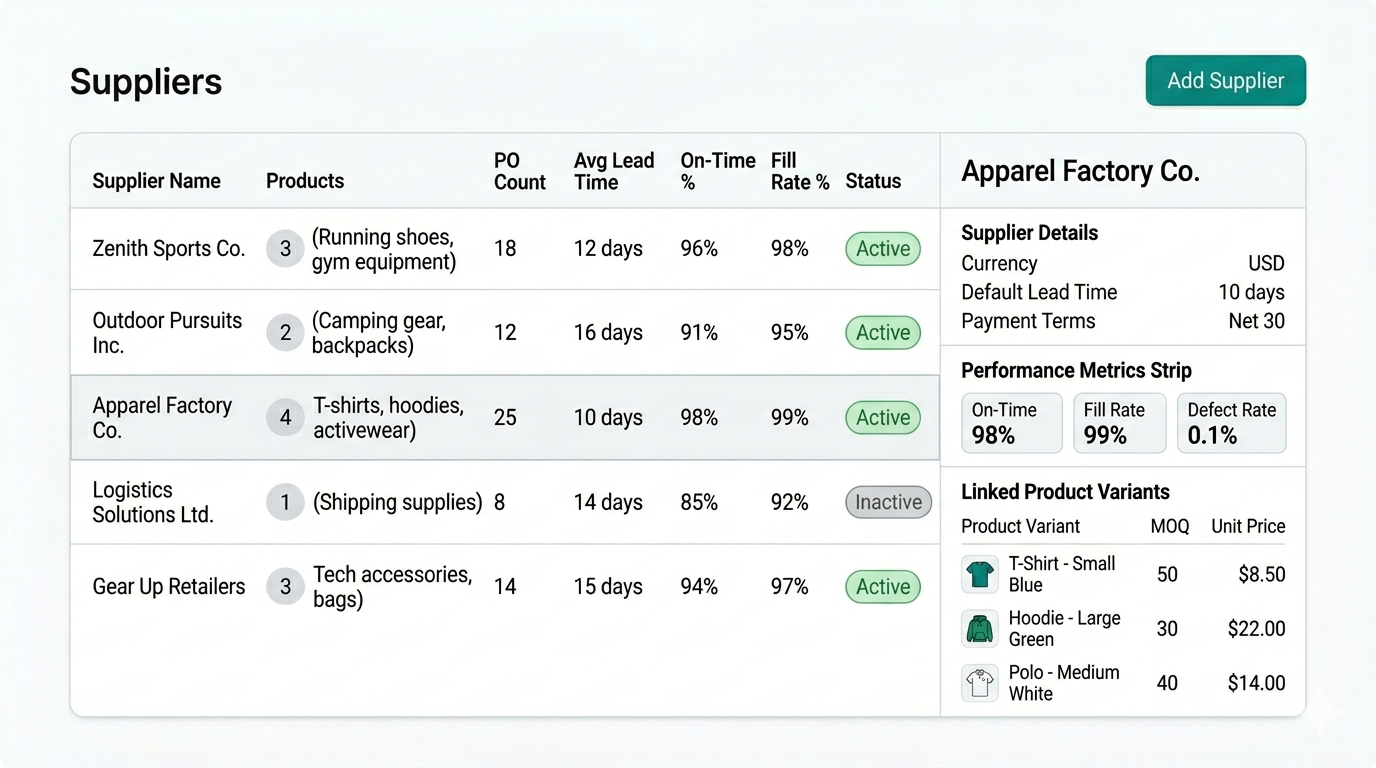
Synplex brings supplier information into the same system as replenishment and purchasing. Lead times feed directly into reorder date calculations. MOQs are validated when purchase orders are created. And supplier performance metrics - on-time rate, fill rate, defect rate - build automatically from actual PO history so the team can make better sourcing decisions over time.
What this page covers
- Store company-level supplier details including currency, payment terms, and default lead time
- Link specific product variants to one or more suppliers with per-variant pricing and MOQ
- Set a primary supplier per variant to drive replenishment recommendations and PO creation
- Track supplier performance - on-time rate, fill rate, defect rate - from real PO history
- Source the same SKU from multiple suppliers at different prices and lead times
The problem
Why disconnected supplier data slows down purchasing
Supplier information that lives outside your inventory system creates constant friction. Lead times get estimated wrong, MOQs get missed, and performance problems go undetected until they become operational failures.
01
Lead times that are estimated rather than tracked
When lead time data is stored in a spreadsheet or remembered by one person, reorder dates become guesses. A small estimation error on a key supplier can turn a healthy stock position into a stockout without warning.
02
No visibility into which supplier is actually performing
Without systematic tracking, it is hard to know which suppliers consistently deliver on time, which have a high defect rate, and which have a fill rate problem that is quietly causing stock discrepancies.
03
Multi-supplier sourcing is hard to manage manually
When the same SKU can be sourced from two suppliers at different prices, lead times, and MOQs, tracking that complexity in a spreadsheet creates constant risk of ordering from the wrong source at the wrong time.
Why Shopify brands use Supplier Management
Strong inventory operations are not only about visibility. Teams need clearer prioritization, faster purchasing workflows, and better control over stock risk.
Two-level supplier model
Synplex separates company-level supplier details from per-variant commercial terms. That means one supplier record can hold different lead times, MOQs, and prices for every variant it supplies - without duplication.
Primary supplier drives replenishment
Set a primary supplier per variant and Synplex uses that supplier's lead time in reorder date calculations and PO recommendations automatically. Switch the primary supplier any time without changing the supplier record itself.
Performance metrics from real PO history
On-time delivery rate, fill rate, and defect rate all populate automatically from actual shipment and receiving data - so supplier performance is always based on what actually happened, not what was promised.
Multi-supplier sourcing per SKU
Link a single product variant to multiple suppliers. Synplex tracks each supplier's terms separately and uses the designated primary supplier for planning, while keeping all alternatives available for manual PO creation.
Where Supplier Management is most valuable
Structured supplier data matters most once sourcing complexity grows beyond a single vendor or a handful of products.
Brands with 3 or more active suppliers
Once a team is managing multiple suppliers with different lead times, currencies, and product ranges, a structured supplier system reduces the risk of using the wrong terms in purchasing decisions.
Operations with strict MOQ requirements
When supplier MOQs and pack sizes need to be respected on every order, having them recorded at the variant level means POs are validated automatically rather than checked manually.
Teams reviewing sourcing strategy
Supplier performance metrics like on-time rate and fill rate help operations and buying teams make informed decisions about which suppliers to consolidate, replace, or negotiate better terms with.
How Supplier Management connects to the rest of Synplex
Supplier data is not just reference information in Synplex - it drives replenishment calculations, PO creation, and performance review across the whole inventory workflow.
Lead time feeds reorder date calculations
The lead time stored on a supplier product is used by the operational replenishment pipeline every night to calculate reorder dates. If the lead time changes, reorder dates update automatically on the next nightly run - no manual recalculation needed.
- Per-variant lead time overrides the supplier default
- Reorder dates recalculate nightly from current lead time
- Lead time changes propagate immediately to replenishment metrics
Screenshot slot — Lead time feeds reorder date calculations
MOQ and pack size validated at PO creation
When a purchase order is created in Synplex, MOQ and pack size for each supplier product are validated automatically. This prevents orders that do not meet supplier minimums from being submitted, reducing the back-and-forth with suppliers over order quantities.
- MOQ validation on every PO line
- Pack size rounding applied automatically
- Supplier SKU included on PO documents
Screenshot slot — MOQ and pack size validated at PO creation
Performance metrics computed from shipment data
The supplier list in Synplex shows computed performance columns for every supplier - products linked, total PO count, average actual lead time, on-time delivery percentage, fill rate, and defect rate. All figures are derived from real receiving data and update as new shipments are recorded.
- On-Time %: deliveries received by or before confirmed date
- Fill Rate %: accepted quantity ÷ ordered quantity
- Defect Rate %: defective units ÷ total delivered units
- All metrics start empty and build from actual PO history
Screenshot slot — Performance metrics computed from shipment data
How Supplier Management works
The workflow below shows how Synplex helps turn inventory data into clearer next actions. This matters most for operators who need a process that feels reliable day after day.
Add a supplier with company-level details
Create a supplier record with name, default currency, payment terms, and default lead time. This becomes the baseline for all products assigned to that supplier.
Link product variants with per-variant terms
Assign specific variants to the supplier and set variant-level lead time, MOQ, pack size, unit price, and supplier SKU. A single variant can be linked to multiple suppliers.
Let performance metrics build from PO history
As purchase orders are confirmed and shipments received, Synplex calculates average lead time, on-time delivery rate, fill rate, and defect rate automatically from actual data.
Designed for purchasing teams that need reliable supplier data
Synplex supplier management is built around the idea that supplier information should live inside the replenishment system - not alongside it in a separate spreadsheet.
Supplier model
Two-level
Company-level details plus per-variant commercial terms for every SKU.
Performance metrics
4 tracked
Average lead time, on-time rate, fill rate, and defect rate - all from real PO data.
Multi-sourcing
Per variant
One variant can be linked to multiple suppliers with independent pricing and lead times.
Frequently asked questions about Supplier Management
Related resources
Feature
Smart Replenishment
Automate your Shopify reordering. Synplex helps brands calculate what to reorder, when to reorder it, and how to plan around lead times and stock risk.
Learn more →
Feature
Purchase Order Management
Create, track, and receive purchase orders natively in Shopify. Synplex covers the full PO lifecycle: draft, confirm, shipment receiving, landed costs, and Shopify inventory sync.
Learn more →
Feature
Demand Forecasting
Synplex builds per-variant, per-location demand forecasts from your Shopify order history. Get monthly demand plans that drive replenishment, reorder dates, and stock projections automatically.
Learn more →
Calculator
Inventory calculators
Reorder point, safety stock, and planning tools.
Explore →
Ready to connect your supplier data to your replenishment workflow?
Set up suppliers in Synplex and let lead times, MOQs, and performance metrics drive better purchasing decisions automatically.