Shopify inventory feature
Manage purchase orders from draft to delivery - inside Shopify
Synplex covers the full PO lifecycle: create orders manually, from replenishment recommendations, or directly from the inventory table. Track shipments, record landed costs, receive goods, and sync stock back to Shopify automatically.
3 ways
PO creation methods
6 statuses
Lifecycle stages
True landed cost
Cost visibility
What Purchase Order Management helps you do
For most growing Shopify brands, purchase orders live in a mix of email threads, spreadsheets, and disconnected supplier portals. That means no single place to track what has been ordered, what is in transit, and what has been received - making it easy to miss deliveries, lose sight of costs, or miscount stock.
Synplex brings the full PO workflow into one operational system. From the moment you decide to reorder a product to the moment goods arrive and update your Shopify inventory, every step is tracked in the same place - with landed costs, payment terms, multi-currency support, and Shopify sync built in.
What this page covers
- Create POs manually, from supply plan recommendations, or directly from the inventory table
- Track every PO through draft, confirmed, in-transit, and completed stages
- Record shipments and receive goods with automatic Shopify inventory sync
- Calculate true landed cost per unit including duties, freight, and additional fees
- Manage payment terms, multi-currency invoices, and payment records in one place
The problem
Why spreadsheet-based PO management breaks at scale
Teams often manage purchase orders well enough with spreadsheets at first. But as supplier count, SKU complexity, and order frequency grow, the gaps in a manual system compound quickly.
01
No visibility into what is actually in transit
When POs live in email and spreadsheets, it becomes hard to see which orders are confirmed, which are delayed, and how much incoming stock to account for in replenishment decisions. That usually leads to either emergency reorders or double-ordering.
02
Landed costs are invisible until it is too late
The unit price on a PO rarely reflects the true cost. Freight, duties, and additional handling fees change the real cost per unit significantly, but most teams only calculate that after the fact - making it hard to price accurately or measure margin.
03
Shopify inventory stays out of sync
When goods arrive and someone forgets to update Shopify manually, stock levels become unreliable. That creates downstream problems for replenishment decisions, sales channels, and customer-facing inventory availability.
Why Shopify brands use Purchase Order Management
Strong inventory operations are not only about visibility. Teams need clearer prioritization, faster purchasing workflows, and better control over stock risk.
Three ways to create a PO
Start a PO manually for one-off orders, convert a supply plan recommendation directly into a PO with pre-filled quantities and supplier details, or multi-select products from the inventory table and add them to a new or existing PO in seconds.
Full lifecycle tracking
Every PO moves through a clear status pipeline - draft, confirmation pending, confirmed, in transit, completed - so the team always knows exactly where each order stands without chasing suppliers for updates.
Landed cost tracking per unit
Record freight, duties, and additional costs against each PO and let Synplex calculate the true landed cost per unit so your real margin is always visible.
Shopify inventory sync on receiving
When you receive a shipment in Synplex, stock quantities can be pushed back to Shopify automatically - keeping your inventory levels accurate without any manual update.
Where PO Management is most valuable
Purchase order tracking becomes significantly more useful once a brand is managing multiple suppliers, regular reorder cycles, and growing product ranges.
Multi-supplier operations
When the same SKU is sourced from two suppliers at different lead times and prices, a structured PO system helps the team track which order came from where and what it actually cost.
High reorder frequency brands
For stores that place orders weekly or bi-weekly, spreadsheet-based PO tracking starts to collapse. A structured system keeps every order visible without manual upkeep.
Finance and operations alignment
When the finance team needs accurate landed costs, payment records, and PO history, a structured system makes periodic reviews much faster and more reliable.
How PO Management fits into your inventory operations
A well-structured PO workflow does more than track orders. It keeps replenishment decisions accurate, makes costs visible, and connects purchasing directly to the operational data the rest of the team relies on.
PO status lifecycle
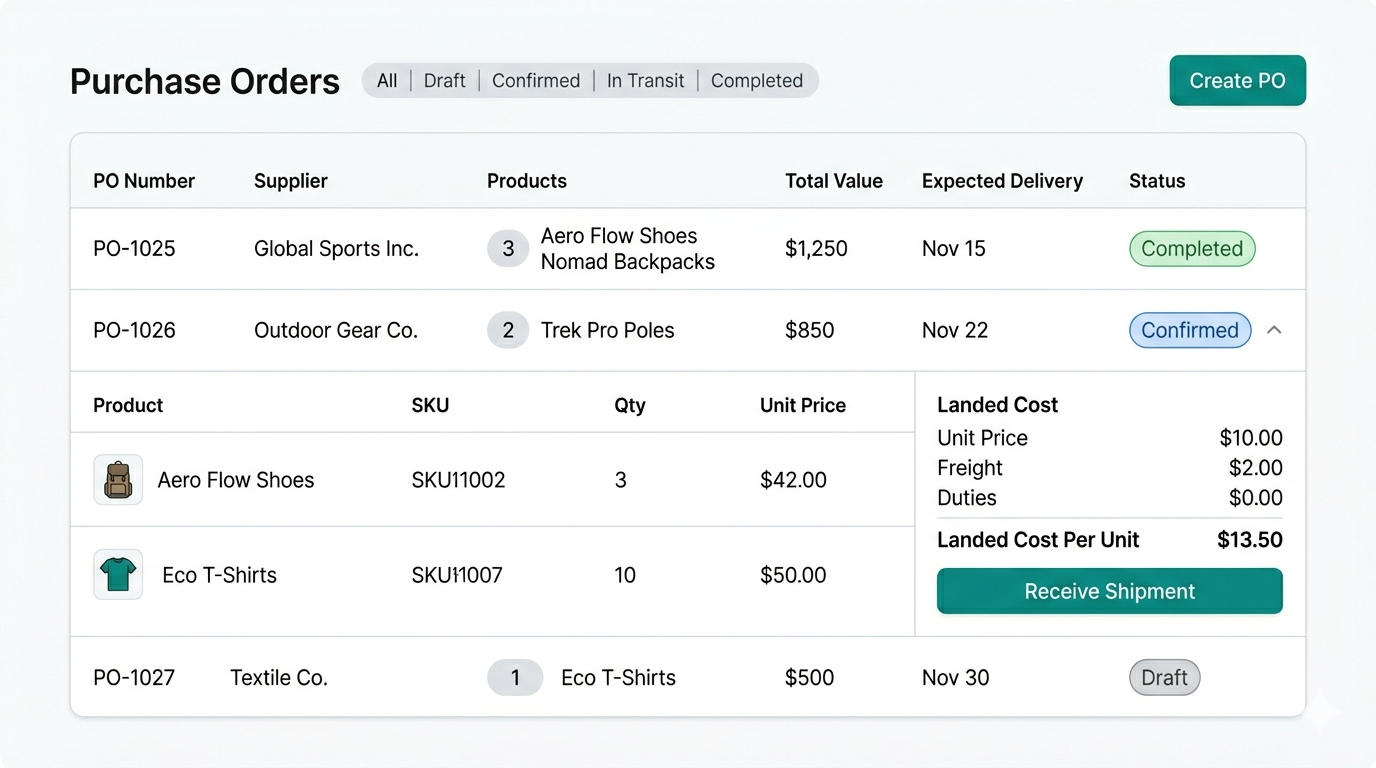
Every purchase order in Synplex moves through a defined status pipeline. Draft orders are fully editable with no commitment made. Once confirmed, the supply plan recalculates automatically to account for incoming stock. When goods arrive and the PO is completed, inventory levels update and the plan recalculates again.
- Draft → Confirmation Pending → Confirmed → In Transit → Completed
- Cancellation available from any status
- Supply plan recalculates automatically on confirm and on completion
Screenshot slot — PO status lifecycle
Landed costs and payment tracking
The purchase price on a PO is rarely the true unit cost. Synplex lets you record freight, duties, and additional fees against each PO so the real landed cost per unit is always calculated and visible - not estimated after the fact.
- Record freight, duties, and handling per PO
- Automatic per-unit landed cost calculation
- Multi-currency support with payment term tracking
- Payment status tracked separately from PO status
Screenshot slot — Landed costs and payment tracking
Shopify inventory sync
When a shipment is received in Synplex, received quantities can be pushed back to Shopify automatically. The sync toggle is configurable per PO, with a shop-level default applied when not explicitly set - so inventory accuracy does not depend on manual updates.
- Per-PO Shopify sync toggle
- Shop-level default applied automatically
- Locked once the PO moves past draft
Screenshot slot — Shopify inventory sync
How Purchase Order Management works
The workflow below shows how Synplex helps turn inventory data into clearer next actions. This matters most for operators who need a process that feels reliable day after day.
Create a PO from the inventory table or supply plan
Multi-select products that need reordering, click Add to PO, and choose to create a new PO or add to an existing one. Supplier, quantity, and expected delivery are pre-filled from your inventory data and replenishment plan.
Confirm the order and track its status
Move the PO from draft to confirmed once the supplier acknowledges. Synplex triggers a supply plan update so replenishment recommendations reflect the incoming stock immediately.
Receive goods and sync to Shopify
Create a shipment, record what was actually received, and let Synplex push the received quantities back to Shopify inventory - keeping your store accurate without a manual step.
Built for operational purchasing workflows
Synplex PO management is designed for Shopify brands that need a more structured purchasing process without the complexity of a full ERP.
PO creation methods
3 ways
Manually, from a supply plan recommendation, or directly from the inventory table.
Lifecycle stages
6 statuses
Draft, confirmation pending, confirmed, in transit, completed, and cancelled.
Cost visibility
True landed cost
Freight, duties, and fees calculated per unit - not just the supplier price.
Frequently asked questions about Purchase Order Management
Related resources
Feature
Smart Replenishment
Automate your Shopify reordering. Synplex helps brands calculate what to reorder, when to reorder it, and how to plan around lead times and stock risk.
Learn more →
Feature
Supplier Management
Manage suppliers, lead times, MOQs, pricing tiers, and supplier performance metrics in one place. Synplex connects supplier data directly to your Shopify replenishment workflow.
Learn more →
Feature
Demand Forecasting
Synplex builds per-variant, per-location demand forecasts from your Shopify order history. Get monthly demand plans that drive replenishment, reorder dates, and stock projections automatically.
Learn more →
Calculator
Inventory calculators
Reorder point, safety stock, and planning tools.
Explore →
Ready to bring your purchasing workflow into one system?
Use Synplex to manage the full purchase order lifecycle - from replenishment decision to Shopify inventory sync - without spreadsheets or disconnected supplier emails.