
Shopify inventory feature
Six inventory reports that tell you exactly what to act on
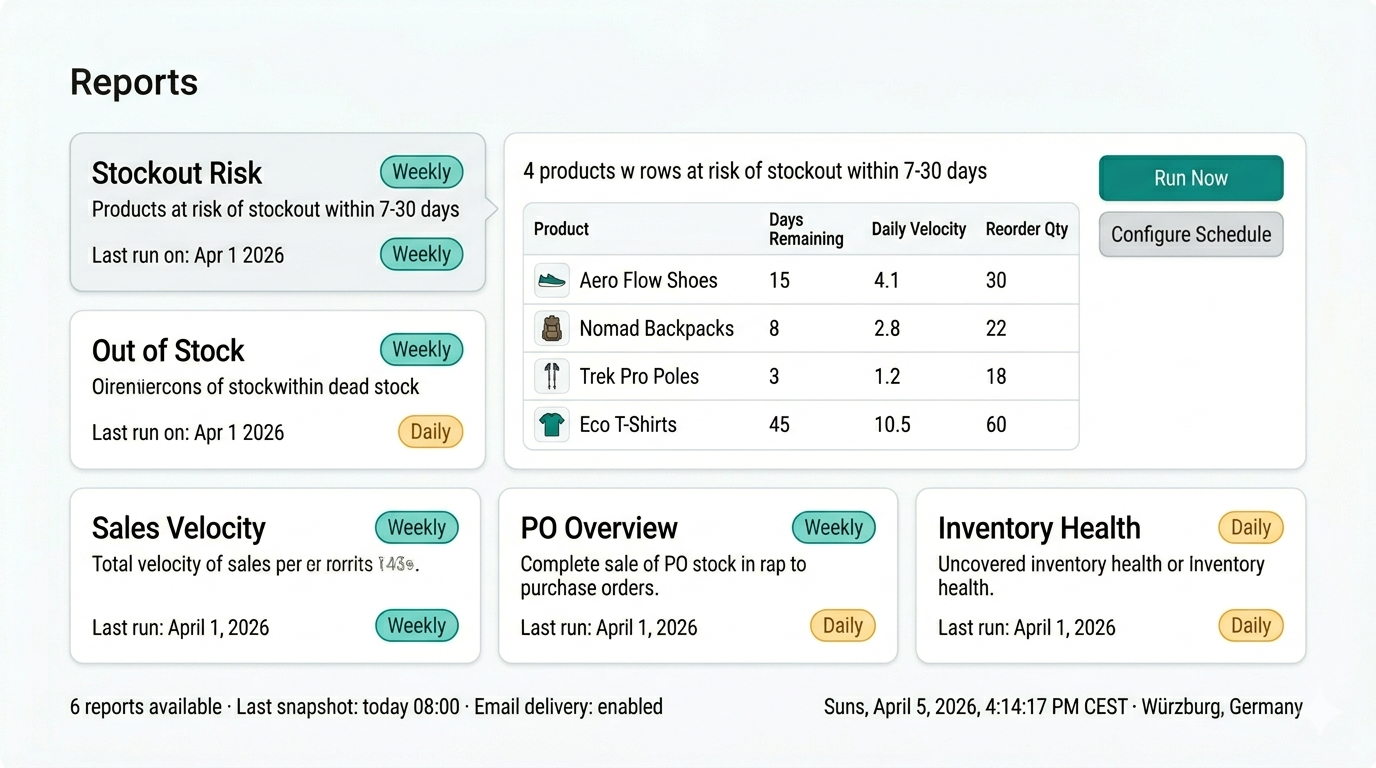
Synplex ships six pre-built inventory reports - stockout risk, out of stock, dead stock, sales velocity, PO overview, and inventory health - all schedulable, shareable, and emailable on your timeline.
6 reports
Pre-built reports
Daily, weekly, monthly
Schedule options
Email delivery
Sharing
What Inventory Reporting helps you do
Inventory data is only useful when it leads to a decision. Most Shopify merchants have access to stock counts, but not to the structured, action-oriented view that tells them what to reorder this week, what is tying up cash, and where a stockout is building quietly in the background.
Synplex provides two complementary reporting layers. The live Inventory Report gives the team a real-time view of current stock levels and statuses for daily decisions. Scheduled reports capture point-in-time snapshots that can be emailed automatically, shared with stakeholders who do not have Synplex access, and stored as a timestamped record of inventory position over time.
What this page covers
- Six pre-built reports covering stockout risk, out-of-stock products, dead stock, sales velocity, PO status, and inventory health
- Schedule any report to run daily, weekly, or monthly with automatic email delivery
- Generate on-demand snapshots at any time without waiting for the next scheduled run
- Share inventory reports with team members or stakeholders who do not have Synplex access
- Build a historical record of inventory position across different dates
The problem
Why reactive inventory reviews cost more than they should
Most inventory problems are not sudden. Stockouts build over days or weeks. Dead stock accumulates slowly. POs go quiet without a follow-up. The cost is in missing the signal early enough to act cheaply.
01
Stockouts are discovered after the sale is lost
When inventory reviews only happen after a customer complaint or a zero-stock notification, the team is already in recovery mode. The reorder that should have happened two weeks ago now needs to be expedited at higher cost.
02
Dead stock is invisible until it is too late to clear
Slow-moving inventory ties up working capital quietly. Without a regular review of products with no recent sales, dead stock accumulates for months before anyone notices how much cash is sitting on a shelf.
03
PO status requires chasing across emails and tools
When purchase order status is tracked in email threads and spreadsheets, it is hard to get a clean view of what is in transit, what is delayed, and what has not been confirmed yet - especially across multiple suppliers.
Why Shopify brands use Inventory Reporting
Strong inventory operations are not only about visibility. Teams need clearer prioritization, faster purchasing workflows, and better control over stock risk.
Live inventory report for daily decisions
The Inventory Report is always live - it reflects current stock levels and statuses in real time. Use it every day to see what needs ordering now, what is running low, and where urgent action is needed.
Scheduled reports for periodic reviews
Configure any of the six pre-built reports to run on a daily, weekly, or monthly schedule. Synplex generates a snapshot at the scheduled time, stores it in history, and emails it to you automatically.
Shareable snapshots for stakeholders
Scheduled reports can be sent to anyone - warehouse managers, finance teams, or agency partners - without giving them access to the full Synplex account.
Historical record for trend analysis
Past report snapshots are stored and accessible so the team can compare inventory position across different dates, track the impact of purchasing decisions over time, and prepare for investor or finance reviews.
Which report to use and when
Each of the six pre-built reports answers a specific operational question. Using the right one at the right frequency makes the difference between reactive and proactive inventory management.
Weekly reorder planning: Stockout Risk report
The Stockout Risk report shows products at risk of running out within 7, 30, 60, or 90 days. Use it weekly - or daily for fast-moving catalogs - to stay ahead of replenishment decisions before they become urgent.
Monthly finance review: Inventory Health report
The Inventory Health report shows total stock value broken down by status - Healthy, Running Low, Overstocked - with per-supplier and per-category views. Use it monthly for cash flow reviews, margin analysis, and finance presentations.
Clearance decisions: Dead Stock report
The Dead Stock report surfaces products with no sales in the configured dead stock window, showing the cost and retail value tied up in each item. Use it weekly to identify candidates for discounting, bundling, or discontinuation before the problem compounds.
The six pre-built reports and what each one covers
Each report is designed to answer a specific operational question. Using the right report at the right frequency is what separates a proactive inventory process from a reactive one.
Stockout Risk and Out of Stock
The Stockout Risk report shows products at risk of running out within 7, 30, 60, or 90 days - giving the team enough runway to reorder before a stockout actually happens. The Out of Stock report shows products already at zero inventory, with daily sales rate and estimated revenue loss per item, for urgent daily triage.
- Stockout Risk: configurable 7, 30, 60, or 90-day windows
- Out of Stock: daily sales and estimated revenue loss per item
- Both recommended for daily or weekly use
Screenshot slot — Stockout Risk and Out of Stock
Dead Stock and Sales Velocity
The Dead Stock report surfaces products with no sales in the configured dead stock window, showing both cost value and retail value tied up in each item. The Sales Velocity report identifies products with unusual sales swings - significant increases or decreases - so the team can spot emerging trends before they affect stock levels.
- Dead Stock: configurable no-sales window, cost and retail value shown
- Sales Velocity: surfaces significant demand increases and decreases
- Both recommended for weekly review
Screenshot slot — Dead Stock and Sales Velocity
PO Overview and Inventory Health
The PO Overview report shows all purchase orders with status, costs, and suppliers - open, completed, and cancelled - giving the team a clean view of what is in transit and what is late without chasing supplier emails. The Inventory Health report shows total stock value broken down by status with per-supplier and per-category breakdowns, making it the primary report for finance reviews and cash flow visibility.
- PO Overview: status, supplier, costs, in-transit and delayed POs
- Inventory Health: total stock value by status, supplier, and category
- PO Overview recommended daily; Inventory Health weekly or monthly
Screenshot slot — PO Overview and Inventory Health
How Inventory Reporting works
The workflow below shows how Synplex helps turn inventory data into clearer next actions. This matters most for operators who need a process that feels reliable day after day.
Choose a report and configure its schedule
Select one of the six pre-built reports - Stockout Risk, Out of Stock, Dead Stock, Sales Velocity, PO Overview, or Inventory Health - and set a frequency: daily, weekly, monthly, or manual only.
Synplex generates and stores snapshots automatically
At each scheduled time, Synplex captures a point-in-time snapshot of your inventory data, stores it in the report's history, and optionally emails it to you. Past snapshots remain accessible for comparison.
Generate on demand any time
You do not need to wait for the next scheduled run. Any report can be generated on demand at any time - useful before a buying meeting, a finance review, or an unplanned reorder decision.
Share with stakeholders outside Synplex
Scheduled reports can be emailed automatically to anyone - warehouse managers, finance teams, or external partners - without giving them access to the full Synplex account.
Reporting designed for operational and financial visibility
Synplex reporting is built around the decisions Shopify operators and finance teams actually need to make - not generic analytics dashboards that require interpretation.
Pre-built reports
6 reports
Stockout Risk, Out of Stock, Dead Stock, Sales Velocity, PO Overview, and Inventory Health.
Schedule options
Daily, weekly, monthly
Or generate on demand at any time without waiting for the next scheduled run.
Sharing
Email delivery
Reports can be emailed automatically to anyone - no Synplex account required to receive them.
Frequently asked questions about Inventory Reporting
Related resources
Feature
Smart Replenishment
Automate your Shopify reordering. Synplex helps brands calculate what to reorder, when to reorder it, and how to plan around lead times and stock risk.
Learn more →
Feature
Purchase Order Management
Create, track, and receive purchase orders natively in Shopify. Synplex covers the full PO lifecycle: draft, confirm, shipment receiving, landed costs, and Shopify inventory sync.
Learn more →
Feature
Demand Forecasting
Synplex builds per-variant, per-location demand forecasts from your Shopify order history. Get monthly demand plans that drive replenishment, reorder dates, and stock projections automatically.
Learn more →
Calculator
Inventory calculators
Reorder point, safety stock, and planning tools.
Explore →
Ready to replace reactive inventory reviews with scheduled reports?
Use Synplex to get the right inventory snapshot at the right time - automatically delivered to your inbox so you always know what to act on next.